
At least 70 percent of America’s 30 million elementary school students use computers, according to a recent New York Times article. As a result of this increased usage, doctors of chiropractic are treating more young patients suffering from the effects of working at computer stations that are either designed for adults or poorly designed for children. Many children are already suffering from repetitive motion injuries (RMI) such as carpal tunnel syndrome and chronic pain in the hands, back, neck and shoulders.
Children Need to Practice Good Computer Ergonomics, Too!
A recently published study conducted by a team of researchers from Cornell University found that 40 percent of the elementary school children they studied used computer workstations that put them at postural risk. The remaining 60 percent scored in a range indicating “some concern.”
“Emphasis needs to be placed on teaching children how to properly use computer workstations,” stated Dr. Scott Bautch, a member of the American Chiropractic Association’s Council on Occupational Health. “Poor work habits and computer workstations that don’t fit a child’s body during the developing years can have harmful physical effects that can last a lifetime. Parents need to be just as concerned about their children’s interaction with their computer workstations as they are with any activities that may affect their children’s long-term health,” added Dr. Bautch.
What can you do?
To reduce the possibility of your child suffering painful injuries, the American Chiropractic Association (ACA) and its Council on Occupational Health offer the following tips:
“If your child continues to complain of pain and strain from sitting at a computer, see a doctor of chiropractic,” urges Dr. Bautch. “A chiropractor can help alleviate your child’s pain and help prevent further injury.”
If you have any questions, don’t hesitate to email me at landrumdc@gmail.com or visit my website http://www.landrumdc.com.
Children Need to Practice Good Computer Ergonomics, Too!
A recently published study conducted by a team of researchers from Cornell University found that 40 percent of the elementary school children they studied used computer workstations that put them at postural risk. The remaining 60 percent scored in a range indicating “some concern.”
“Emphasis needs to be placed on teaching children how to properly use computer workstations,” stated Dr. Scott Bautch, a member of the American Chiropractic Association’s Council on Occupational Health. “Poor work habits and computer workstations that don’t fit a child’s body during the developing years can have harmful physical effects that can last a lifetime. Parents need to be just as concerned about their children’s interaction with their computer workstations as they are with any activities that may affect their children’s long-term health,” added Dr. Bautch.
What can you do?
To reduce the possibility of your child suffering painful injuries, the American Chiropractic Association (ACA) and its Council on Occupational Health offer the following tips:
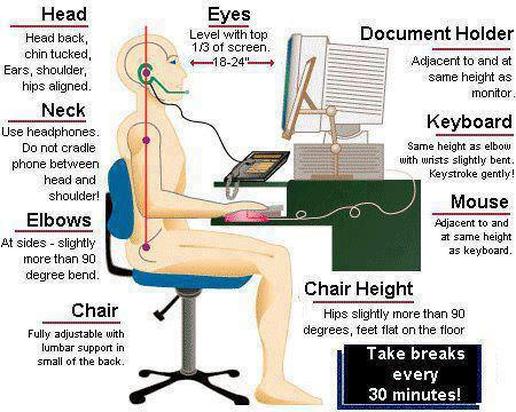
- If children and adults in your home share the same computer workstation, make certain that the workstation can be modified for each child’s use.
- Position the computer monitor so the top of the screen is at or below the child’s eye level. This can be accomplished by taking the computer off its base or stand, or having the child sit on firm pillows or phone books to reach the desired height.
- Make sure the chair at the workstation fits the child correctly. An ergonomic back cushion, pillow or a rolled-up towel can be placed in the small of the child’s back for added back support. There should be two inches between the front edge of the seat and the back of the knees. The chair should have arm supports so that elbows are resting within a 70- to 135-degree angle to the computer keyboard.
- Wrists should be held in a neutral position while typing – not angled up or down. The mousing surface should be close to the keyboard so your child doesn’t have to reach or hold the arm away from the body.
- The child’s knees should be positioned at an approximate 90- to 120-degree angle. To accomplish this angle, feet can be placed on a foot rest, box, stool or similar object.
- Reduce eyestrain by making sure there is adequate lighting and that there is no glare on the monitor screen. Use an antiglare screen if necessary.
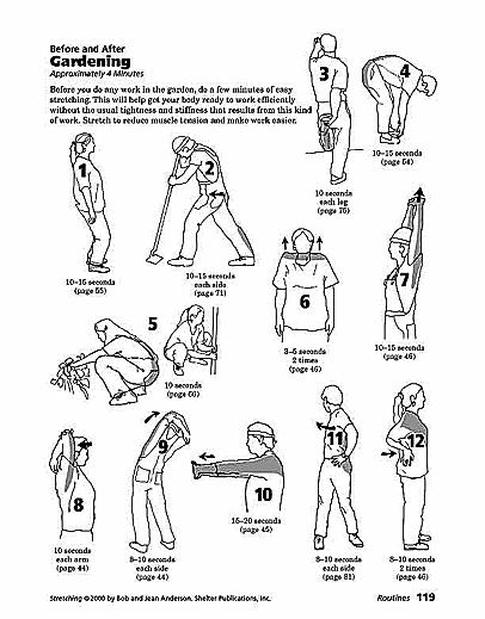
- Limit your child’s time at the computer and make sure he or she takes periodic stretch breaks during computing time. Stretches can include: clenching hands into fists and moving them in 10 circles inward and 10 circles outward; placing hands in a praying position and squeezing them together for 10 seconds and then pointing them downward and squeezing them together for 10 seconds; spreading fingers apart and then closing them one by one; standing and wrapping arms around the body and turning all the way to the left and then all the way to the right.
- Your child’s muscles need adequate hydration to work properly and avoid injury. Encourage your child to drink four 8-ounce glasses of water a day. Carbonated beverages, juices and other sweet drinks are not a substitute.
- Urge your child’s school or PTA officials to provide education on correct computer ergonomics and to install ergonomically correct workstations.
“If your child continues to complain of pain and strain from sitting at a computer, see a doctor of chiropractic,” urges Dr. Bautch. “A chiropractor can help alleviate your child’s pain and help prevent further injury.”
If you have any questions, don’t hesitate to email me at landrumdc@gmail.com or visit my website http://www.landrumdc.com.


 RSS Feed
