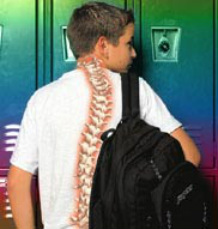
Its back to school time and many parents are asking themselves: How is my kid going to carry all of those school books? I also have an image in my mind of the child having to lean forward to try and counterbalance the weight of the heavy back pack.
Are you sending your child off to the first day of school with a brand new backpack tossed over his or her shoulder? Although backpacks have become as common as pencils & paper in schools across the nation, you may want to think twice before your child leaves for school each morning. While carrying a backpack may seem harmless, it can cause some health problems, including back and neck problems that may or may not be painful. Such problems may have drastic long-term implications if the results of these poor habits are left uncorrected.
Check The Numbers
New research reveals an alarming danger associated with improper childhood backpack use. According to the U.S. Consumer Product Safety Commission, of the 6,512 children treated in hospital emergency rooms last year for injuries related to shouldering backpacks, 54% involved children ages 5 to 14. Carrying a backpack can cause not only acute injury, but also long term damage. For example, carrying 12 pounds in a backpack and lifting it 10 times per day equals 120 pounds lifted per day. That is equivalent to 21,600 pounds lifted in a school year (nearly 11 tons) or the equivalent of six full size automobiles!
However, you don't need to be a scientist to understand the effects of backpacks on children. Visit any school and watch youths as they struggle to walk while bent sideways under the weight of an overloaded backpack that is carried on one shoulder. You will quickly realize the potential danger of this common school necessity.
How exactly would carrying a backpack affect a child’s spine? Carrying a heavy load that is distributed unevenly or improperly, day after day, week after week, can indeed cause stress to the spinal column of a growing child. “As the twig is bent, so grows the tree” is a phrase that often comes to mind when seeing children lugging backpacks around.
A Cure for the Back Pack Blues
Back pain is pervasive in our society. Much of this is brought on by bad habits that were started during our younger years – such as carrying overweight backpacks to school. Slinging a heavy backpack over one shoulder every day may provoke serious postural misalignments and joint irritation.
Chiropractors have long recognized the spinal health hazards of heavy backpack use and are experts in correcting misalignments. As specialists in spinal biomechanics, chiropractors also work to educate parents and the community about the proper use of backpacks.
Important Steps in Preventing Backpack Related Injuries
In an effort to reduce backpack related injuries, follow the preventative measures below to ensure the health and safety of your child.
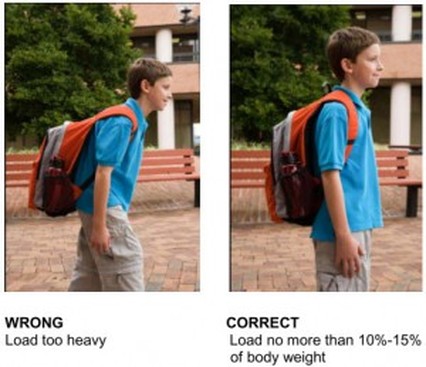
* The maximum weight for your child's loaded backpack should not exceed 10-15% of his or her body weight. For example, an 80-pound child should not carry more than 12 pounds in a pack. If the backpack is heavier, it will cause your child to bend forward in an attempt to support the weight on his or her back rather than on the shoulders. This rounding of the shoulders will result in back, shoulder and neck pain.
* Insist that your child wear both shoulder straps. Luggin g a backpack with one shoulder strap causes the child to lean to one side to compensate for the uneven weight. This can cause permanent misalignment of the spine, neck and back pain, muscle fatigue and lowered state of health. The bottom of the backpack should rest in the curve of the lower back and the top touch just below the big knob on the back of your neck.
* Padded straps are very important. Look for backpacks with wide padded shoulder straps to avoid pressure on the nerves around the armpits. Padded waist straps that keep the backpack close to the body will help maintain proper balance.
* Teach your child to pack his or her backpack by evenly distributing the contents. Keep the heaviest items closest to your back and avoid loading unnecessary items. The more spread out a load is, the less strain it puts on any one part of the body.
* Often ignored is the act of lifting the backpack. Bend at the knees, use both hands, check the weight of the pack and lift with your legs, not your back. Carefully put one shoulder strap on at a time. Never sling the pack onto one shoulder.
* For older students, encourage them to make frequent trips to their locker between classes to replace books. If the backpack is still too heavy to take home, talk to your child’s teacher. It might be possible to obtain two sets of books or bring home only lighter hand-out materials or workbooks.
* Talk to your child about the importance of using a backpack properly. A child who is educated early in life on the importance of ergonomics can apply this knowledge in the home and office as they grow older, and will be happier and healthier as a result.
Chiropractic care can help
It is important to remember that like many health problems, spinal disorders often go unnoticed and therefore ignored. Because of this, it is especially important to call your Chiropractor if your child experiences any pain or discomfort in the shoulders, neck, legs or back. This way, any potential spinal or postural problems can be addressed and corrected before they get worse. Spinal correction is specific and gentle with a child. If you're a parent, don't ignore this potential threat to your child's health. Schedule a chiropractic evaluation for your youngster today.
Are you sending your child off to the first day of school with a brand new backpack tossed over his or her shoulder? Although backpacks have become as common as pencils & paper in schools across the nation, you may want to think twice before your child leaves for school each morning. While carrying a backpack may seem harmless, it can cause some health problems, including back and neck problems that may or may not be painful. Such problems may have drastic long-term implications if the results of these poor habits are left uncorrected.
Check The Numbers
New research reveals an alarming danger associated with improper childhood backpack use. According to the U.S. Consumer Product Safety Commission, of the 6,512 children treated in hospital emergency rooms last year for injuries related to shouldering backpacks, 54% involved children ages 5 to 14. Carrying a backpack can cause not only acute injury, but also long term damage. For example, carrying 12 pounds in a backpack and lifting it 10 times per day equals 120 pounds lifted per day. That is equivalent to 21,600 pounds lifted in a school year (nearly 11 tons) or the equivalent of six full size automobiles!
However, you don't need to be a scientist to understand the effects of backpacks on children. Visit any school and watch youths as they struggle to walk while bent sideways under the weight of an overloaded backpack that is carried on one shoulder. You will quickly realize the potential danger of this common school necessity.
How exactly would carrying a backpack affect a child’s spine? Carrying a heavy load that is distributed unevenly or improperly, day after day, week after week, can indeed cause stress to the spinal column of a growing child. “As the twig is bent, so grows the tree” is a phrase that often comes to mind when seeing children lugging backpacks around.
A Cure for the Back Pack Blues
Back pain is pervasive in our society. Much of this is brought on by bad habits that were started during our younger years – such as carrying overweight backpacks to school. Slinging a heavy backpack over one shoulder every day may provoke serious postural misalignments and joint irritation.
Chiropractors have long recognized the spinal health hazards of heavy backpack use and are experts in correcting misalignments. As specialists in spinal biomechanics, chiropractors also work to educate parents and the community about the proper use of backpacks.
Important Steps in Preventing Backpack Related Injuries
In an effort to reduce backpack related injuries, follow the preventative measures below to ensure the health and safety of your child.
* The maximum weight for your child's loaded backpack should not exceed 10-15% of his or her body weight. For example, an 80-pound child should not carry more than 12 pounds in a pack. If the backpack is heavier, it will cause your child to bend forward in an attempt to support the weight on his or her back rather than on the shoulders. This rounding of the shoulders will result in back, shoulder and neck pain.
* Insist that your child wear both shoulder straps. Luggin g a backpack with one shoulder strap causes the child to lean to one side to compensate for the uneven weight. This can cause permanent misalignment of the spine, neck and back pain, muscle fatigue and lowered state of health. The bottom of the backpack should rest in the curve of the lower back and the top touch just below the big knob on the back of your neck.
* Padded straps are very important. Look for backpacks with wide padded shoulder straps to avoid pressure on the nerves around the armpits. Padded waist straps that keep the backpack close to the body will help maintain proper balance.
* Teach your child to pack his or her backpack by evenly distributing the contents. Keep the heaviest items closest to your back and avoid loading unnecessary items. The more spread out a load is, the less strain it puts on any one part of the body.
* Often ignored is the act of lifting the backpack. Bend at the knees, use both hands, check the weight of the pack and lift with your legs, not your back. Carefully put one shoulder strap on at a time. Never sling the pack onto one shoulder.
* For older students, encourage them to make frequent trips to their locker between classes to replace books. If the backpack is still too heavy to take home, talk to your child’s teacher. It might be possible to obtain two sets of books or bring home only lighter hand-out materials or workbooks.
* Talk to your child about the importance of using a backpack properly. A child who is educated early in life on the importance of ergonomics can apply this knowledge in the home and office as they grow older, and will be happier and healthier as a result.
Chiropractic care can help
It is important to remember that like many health problems, spinal disorders often go unnoticed and therefore ignored. Because of this, it is especially important to call your Chiropractor if your child experiences any pain or discomfort in the shoulders, neck, legs or back. This way, any potential spinal or postural problems can be addressed and corrected before they get worse. Spinal correction is specific and gentle with a child. If you're a parent, don't ignore this potential threat to your child's health. Schedule a chiropractic evaluation for your youngster today.


 RSS Feed
